



The order types you actually have
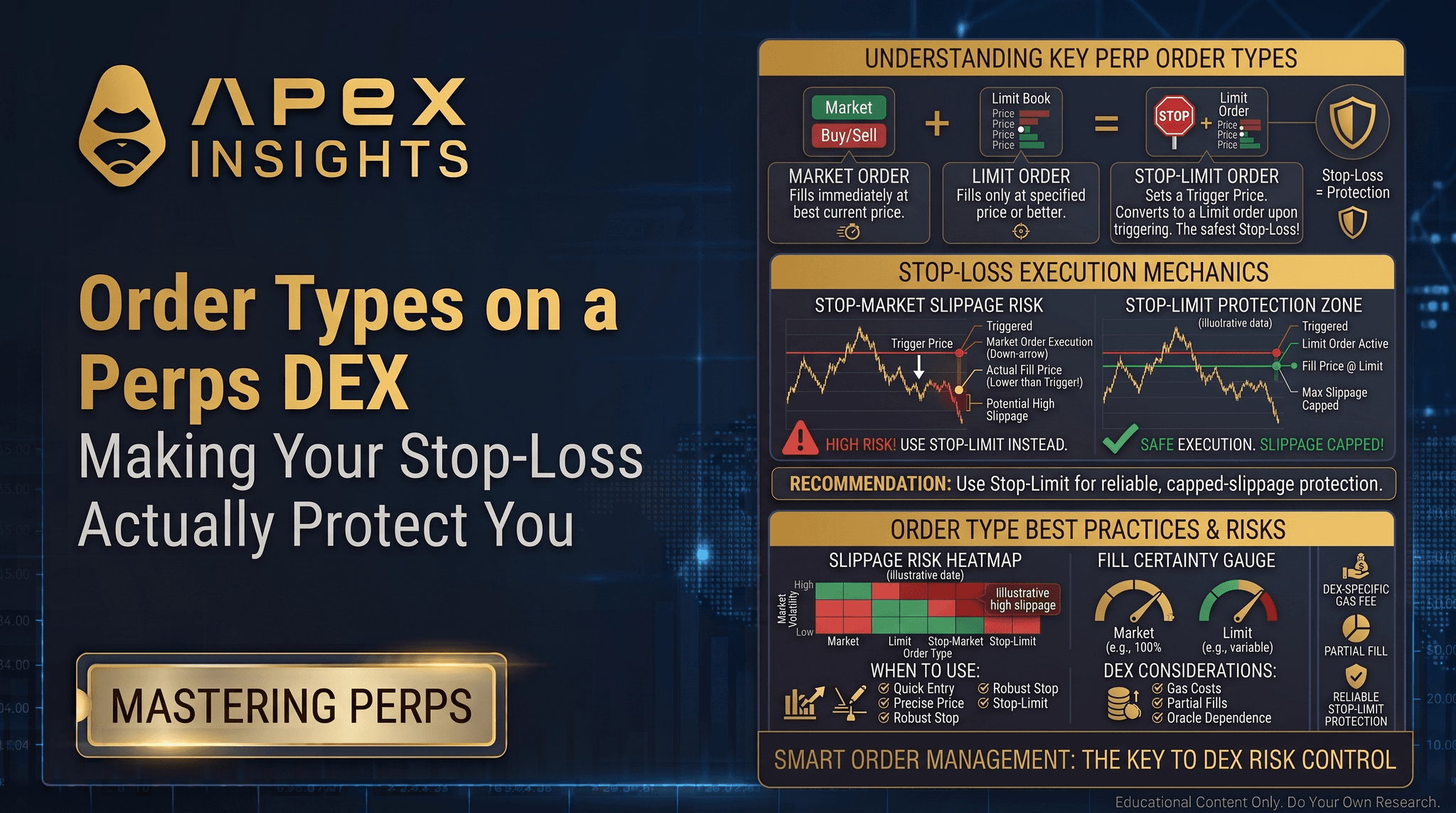
Every order is a trade-off between two things you cannot both have: control over the price, and certainty of execution. Pin the price and you might not fill; demand a fill and you cannot pin the price. Every order type is just a different point on that line (ApeX docs).
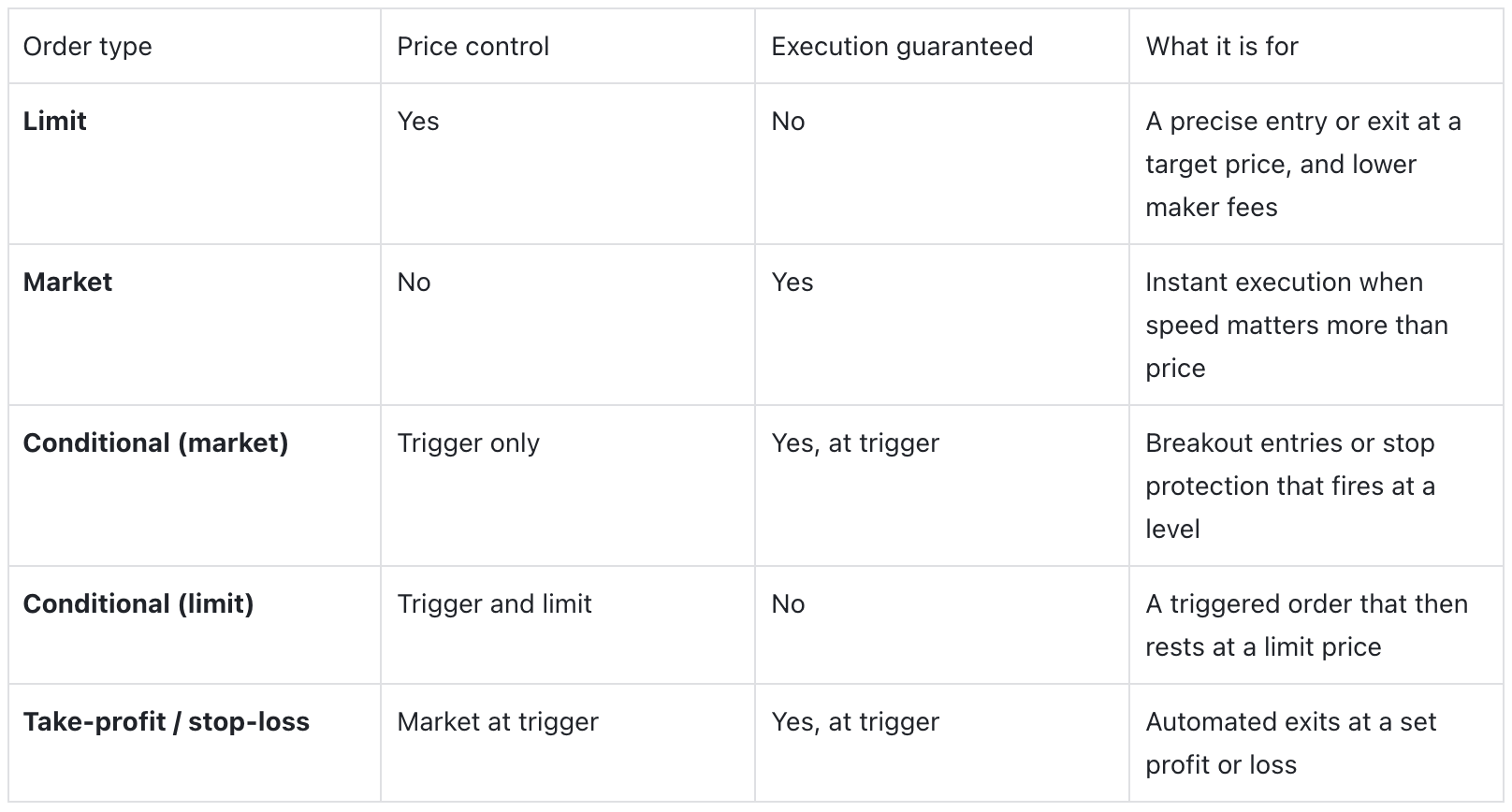
A limit order names your price and waits. A buy fills at your price or better, never worse, but only if the market comes to you; it can sit unfilled forever. Because it rests on the book and adds liquidity, it is a maker order and pays the lower fee. A market order does the opposite: it takes the best prices available right now, guaranteeing you fill but not the price you fill at, and it pays the higher taker fee. That is the whole tension in one sentence. The limit protects your price and risks no fill; the market protects your fill and risks your price.
Watch a stop-loss slip
Here is the trap made concrete. Take the long from earlier in the series: entered at $102, with a stop-loss set to trigger at $97.
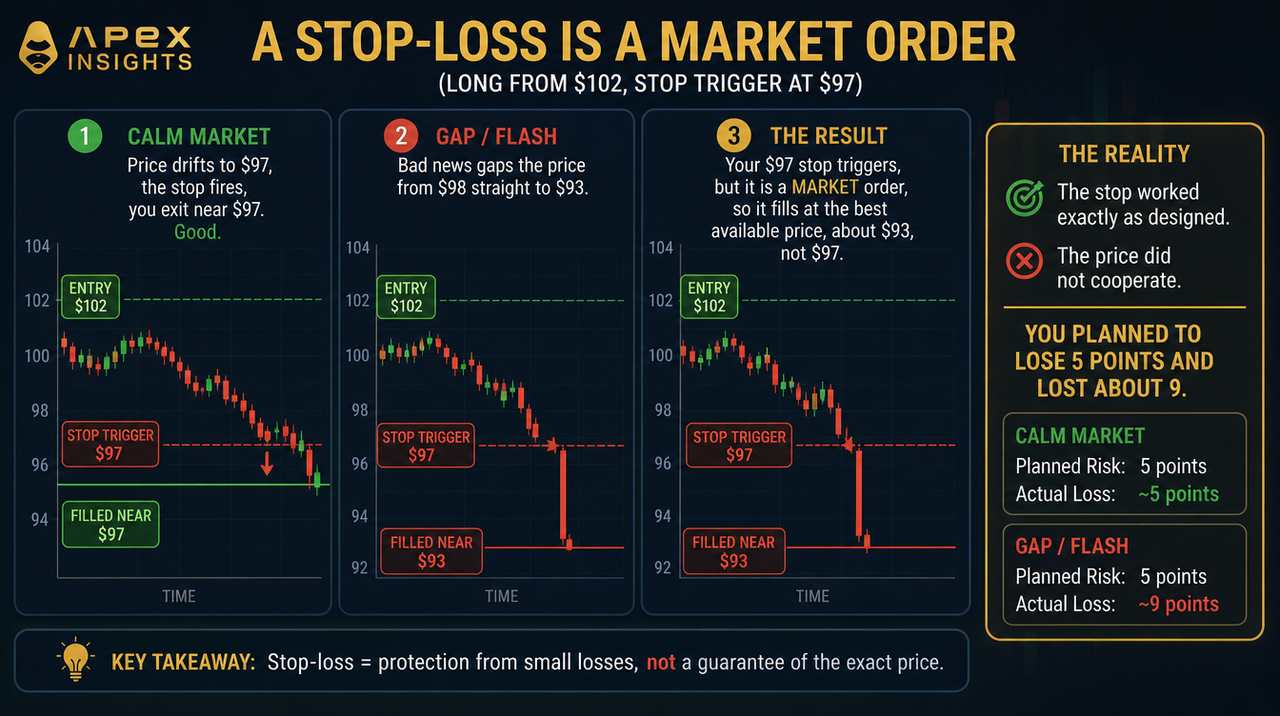
On ApeX Omni, take-profit and stop-loss orders both function as market orders once triggered, they execute at the best available price, and slippage is possible in fast or thin markets. This is not a flaw in the exchange; it is what "guaranteed execution" costs. A market stop guarantees you get out. It cannot also guarantee the price, because in a gap there simply is no trade available at your level.
There is an alternative, and it has the opposite failure. You can set a conditional limit as your stop: when the trigger hits, it places a limit order at a price you choose rather than sweeping the book. That protects you from slippage, but it introduces a worse risk. If the price gaps clean through your limit, the order does not fill at all, and you are left holding the position as it keeps falling, with no protection and a growing loss. So the choice is stark and unavoidable: a market stop takes a certain exit at an uncertain price, and a limit stop takes a certain price at an uncertain exit. In a genuine crash, the market stop is usually the one that saves you, slippage and all.
The trigger price is half the decision
The other half of a working stop is which price triggers it, and this is where the previous part pays off. ApeX Omni lets you trigger a stop-loss on the last price, the mark price, or the index price (ApeX docs).
Trigger on the last price and your stop reacts to the fast, wick-prone tape, so a momentary spike that never reflected real value can fire it and close you for nothing. Trigger on the mark price, the smoothed, manipulation-resistant number from the previous part, and a lone wick will not touch it; the stop only fires when the cross-exchange fair value genuinely reaches your level. The cost is a fraction of a second of lag. For most risk-management stops, the mark-price trigger is the right default, because it will not throw you out of a good position on a fake move. For a fast momentum exit where you want out the instant the tape prints your level, the last price has its place. Choose it on purpose, not by leaving the default.
Reputation versus evidence
Placing the stop so it actually protects
Attach the stop when you open, not later. ApeX Omni lets you set take-profit and stop-loss on the position itself, reduce-only by default, so it can only close and never accidentally add. Do it at entry, when you are calm, exactly as the finale argued.
Trigger risk-management stops on the mark price. It is the number that liquidates you, and using it for your stop means a manipulative wick will not.
Use a market stop for protection, and size for slippage. In the crash you are protecting against, a limit stop may not fill. Take the market stop, and assume your real loss can be a little worse than the level, especially on thin pairs.
Use limit orders for entries you can wait for. They give you price control and the lower maker fee. Save market orders for when being in now genuinely matters more than the price.
Widen stops on illiquid pairs. A deep book like BTC or ETH absorbs a market stop with little slippage; a thin altcoin perp does not, so give it more room or trade it smaller.
Common mistakes
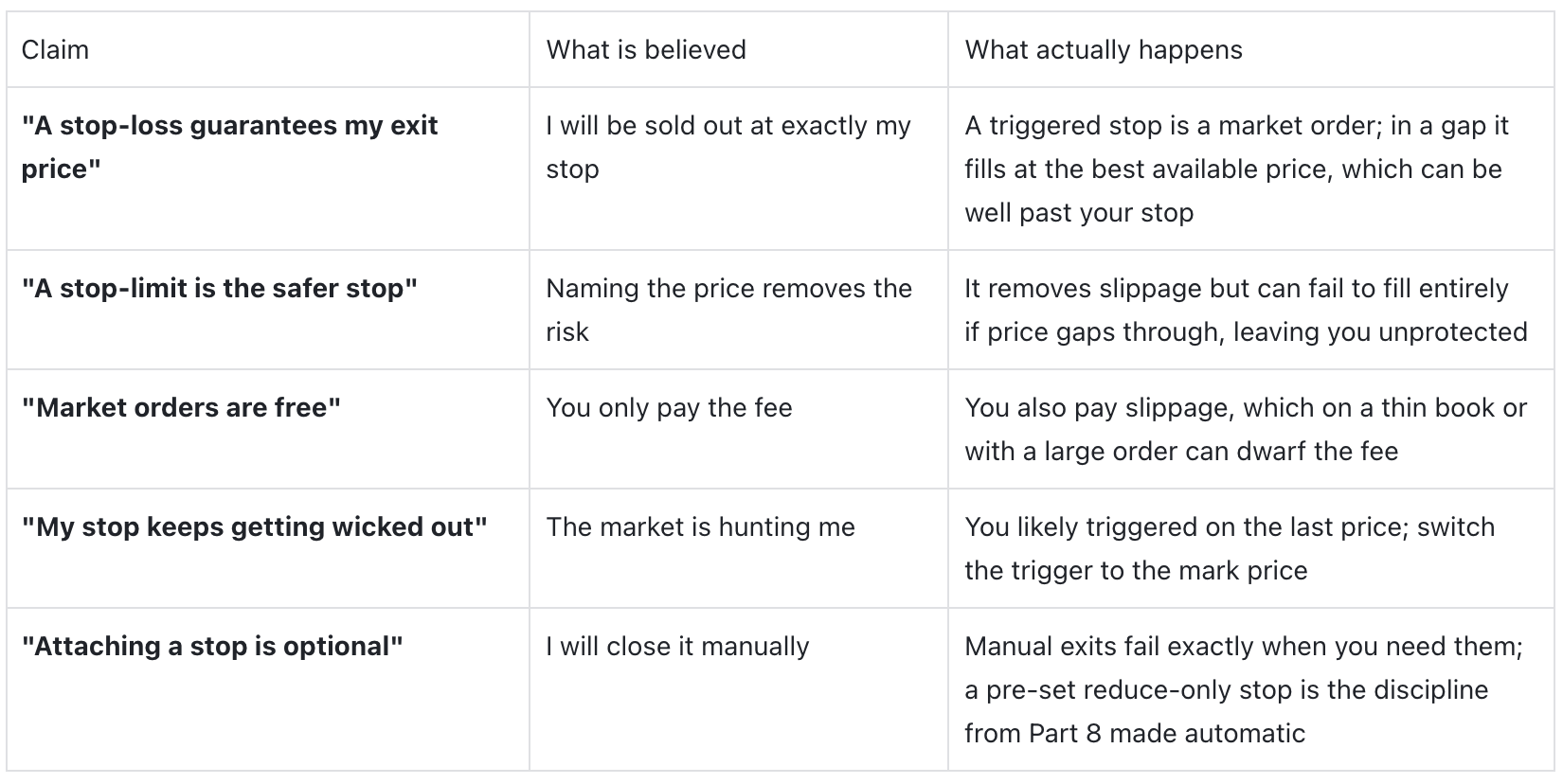
Treating a stop-loss as a guaranteed price - it guarantees an exit, not the level, and the gap between them is slippage.
Choosing a stop-limit to "be safe" - you can be perfectly safe from slippage and still be unprotected because it never filled.
Leaving the trigger on the last price - and then blaming stop-hunting when a wick closes you; switch to the mark.
Market-ordering size into a thin book - the slippage on a big market order in an illiquid pair can be worse than several days of fees.
Planning to exit manually - the one time you must act is the one time you freeze; automate the stop.
Order types on ApeX Omni
Because ApeX Omni is a perpetuals DEX, the full toolkit is there on every USDT pair: limit orders with time-in-force, post-only and reduce-only flags; market orders; conditional market and conditional limit orders for triggered entries and breakouts; and take-profit and stop-loss orders that are reduce-only by default and let you trigger on the last, mark, or index price and scale out in partial sizes. Placing and cancelling orders costs no gas or trading fee; you pay only on fills. The practical throughline is the one this whole series keeps returning to: decide your exit before you enter, make it a real order rather than a plan, trigger it on the mark price, and accept that a guaranteed exit and a guaranteed price cannot be the same order. Read the full Order Types guide, then set a proper stop on your next position on ApeX Omni.
The bottom line
Order types are not a dull menu, they are the machinery that turns "set a stop" from a hope into a mechanism. The central fact to carry away is that you can never have both a guaranteed exit and a guaranteed price in the same order: a market stop protects your escape and risks the level, a limit stop protects the level and risks your escape, and in a real crash the market stop is usually the one that gets you out. Choose the type on purpose, trigger it on the mark price so a wick cannot fake it, attach it the moment you enter, and size for the slippage you cannot rule out. Do that and the stop the series told you to set stops being a comforting line on a chart and starts being the thing that actually saves the account.
Frequently asked questions
Is a stop-loss a guaranteed exit price? No. On ApeX Omni a triggered stop-loss is a market order, so it guarantees you exit but not the price. In a fast or gapping market it fills at the best available price, which can be worse than your stop level.
What is the difference between a market order and a limit order? A market order fills instantly at the best available price but does not control the price and pays the taker fee. A limit order names your price and pays the lower maker fee, but only fills if the market reaches it, and may not fill at all.
Should my stop-loss trigger on the last price or the mark price? For most risk-management stops, use the mark price, because it is manipulation-resistant and a single-venue wick will not fire it. Use the last price only when you want the fastest possible reaction to the tape.
What is a conditional order? An order that only activates when a trigger price is reached. A conditional market order then fills at market; a conditional limit order then rests at a limit price, which controls your price but may not fill.
Why did my stop-loss fill at a worse price than I set? Because it is a market order and the market gapped through your level, so there was no trade available at your stop price. This is slippage, and it is largest in thin or fast-moving markets.
Does placing a stop-loss cost extra? No. On ApeX Omni, placing and cancelling orders costs no gas or trading fee. You pay only when an order fills.
Explore more from this series: Part 8: Putting It All Together | Part 9: Leverage and Liquidation | Part 10: Funding Rates | Part 11: Mark, Index and Basis | Part 13: Do Trading Indicators Actually Work? - Coming Soon
This article is for educational and informational purposes only and is not financial, investment, or legal advice. Do your own research before making any trading decision.